Minggu, Mei 15, 2011

Mengedit model dengan cepat menggunakan fitur move face dan instant3D


Dengan Feature Move Face kita bisa melakukan editing model dengan cepat. Kita bisa offset,translate ataupun rotate face.

Untuk mengakses perintah move face.
Klik Insert -> Face -> Move Face

Perintah Move Face ini bisa kita gunakan untuk file import yang tidak mempunyai history pembuatannya (feature manager). Jadi apabila kita punya model dari sistem CAD yang lain kita bisa mengeditnya di solidworks dengan cepat dan mudah dengan menggunakan feature Move Face.

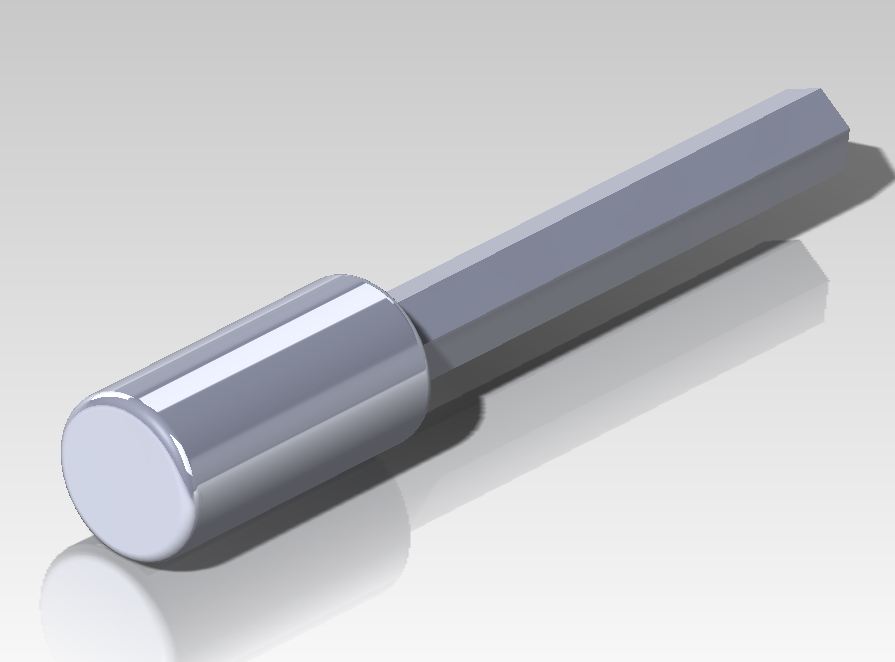
Sebagai contoh model di bawah ini;


Klik insert -> Face -> Move Face
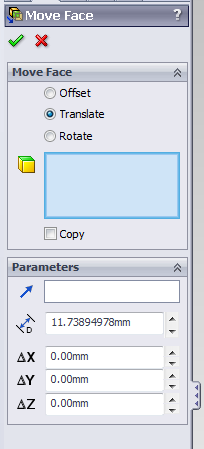

Pilih translate.

Lalu pilih permukaan yang ingin kita ubah.

Maka akan muncul triad.

Pilih sumbu mana permukaan akan kita tarik, lalu drag.


Lalu OK.


Konsep yang sama untuk offset dan rotate.
Untuk rotate masukan referensi sumbu putarnya, bisa menggunakan edge atau axis.
Kita juga bisa meng copy bentukan dengan memilih pilihan copy.

======================= >>>

Instant 3D

Salah satu tools untuk melakukan pengeditan dengan cepat adalah instant3D.

Aktifkan Instant3D pada toolbar feature,


Bagaimana cara kerjanya?

Sangat sederhana dan mudah, pilih face -> lalu muncul dimensi atau tanda panah -> lalu drag 


Salah satu kelebihan dari move face dan instant3D adalah menjaga feature dan design intent, tidak seperti teknologi ST yang menghancurkan history pembuatan atau feature, sehingga aplikasi di lapangan sangat sulit untuk digunakan.*

*(opini pribadi)

Cara Cepat Memahami Ikon PDMW


Silahkan download di link ini, untuk memahami ikon pdmw. format dokument pdf.

Jumat, April 22, 2011

Info : Kontes design SolidWorks

Meneruskan informasi mengenai kontes design yg diselenggarakan oleh SolidWorks ...silahkan informasi lengkapnya ada di bawah ini ;

=======================================

Win a trip to Belize and more in the SolidWorks Green Design Contest

I'm excited today to write about the launch of our SolidWorks Green Design Contest, in honor of Earth Day. Many of you may not yet have tried the environmental assessment tool that comes free with SolidWorks, called SustainabilityXpress. Those of you who have played with Sustainability may not realize how useful it can be when used in conjunction with our Simulation tools.
Hopefully this contest will give you a nice excuse to try 'em all...especially with some cool trips and gadgets on the line. The concept of the challenge is pretty simple. We've provided a rather plain-looking model of a chair, and are asking you to redesign it -- or design it anew -- to make it functional, beautiful, and more sustainable.
If you're up to the challenge you could win some cool stuff. The Grand Prize in the commercial contest is a trip to Chaa Creek Eco Lodge in Belize:
Chaacreek_room Chaacreek_bike

I've been there, and yes, it's as awesome as it looks.
The Grand Prize for the student contest is a trip to SolidWorks World 2012. And for the runners-up, we're handing out a total of 14 iPads (including 3 for our top Reseller designs). There are 56 winners in all in the various categories, so your chances are pretty good!
I'm looking forward to checking out your designs with these characters on the judging panel:
• Al Dean, Editor-in-Chief, Develop3D and the newly-launched Develop3D Sustainability magazines
• Sol Diamond, Assistant Professor, Thayer School of Engineering at Dartmouth College
• Josh Mings, Owner/Editor, SolidSmack.com• Mark Buckley, VP of Environmental Affairs, Staples
• Stephen Endersby, Simulation Product Manager, SolidWorks
• Rick Chin, Director of Product Innovation, SolidWorks
• Asheen Phansey, Sustainability Product Manager, SolidWorks (that's me)
Why a contest for sustainable design? Earth Day is a celebration of our planet, and reminds us that the actions we take every day in doing our jobs can have a tremendous impact -- positive or negative -- on the natural capital and vibrant ecosystems that make the Earth our home. With 400K+ commercial users and 1M+ educational users, SolidWorks designers make a lot of the "stuff" that we use every day. What if we could boost awareness of the lifecycle impacts of our designs and products?
What I want everyone to realize is that you don’t always need to make sacrifices to advance sustainability -- you can make a product that’s greener, and still functional and beautiful. In invite you to "watch this space" for some tips and tricks for winning the contest in the weeks to come!
You can find out more about the SolidWorks Green Design Contest on our website.
And, because I can't resist, a couple more pictures of Chaa Creek, notably the bar and the nearby Mayan ruins in Guatemala...

Kamis, April 07, 2011

Bagaimana Cara Membuat Knurling di Model 3D ?


Untuk pembuatan knurling bisa di 3D modelling atau di drawing. Pada posting ini akan di bahas pembuatan knurling di 3D modelling dengan teknis surface finish.


Model di atas akan di berikan knurling pada silinder yang lebih besar diameternya.
Langkahnya :
- Klik permukaan, lalu pilih appearance 

Maka isi dialog box seperti pada gambar di bawah ini,


- Pilih surface finish 
- Pilih Knurling

- Pada TAB Mapping masukan nilai sesuai dengan yang di inginkan, di sesuaikan dengan hasil bentukan yang proporsional.

- Klik centang (OK)
- Berikut ini gambar hasilnya.